The MailboxValidator Laravel Email Validation Package is an easy-to-use Laravel package that enables Laravel users to validate email addresses with just a few lines of code. This package uses the MailboxValidator API to perform email validation, so you must sign up for an API key before using it.
Once you have obtained your API key, the next step is to install the package using Composer. Open your terminal, navigate to your project root directory, and run the following command:
Composer will automatically install the package into your project. Depending on your network speed, the installation process may take a few minutes.
The service provider will be automatically discovered. For Laravel versions below 5.5, you may need to register the service provider manually. Open config/app.php and add the following line to the providers section:
Here we will show you how to use this package to validate user registration email. To do so we will need to create a new form controller to handle user registration form and form validation. Create a new controller call RegisterController.php and save it under your_project_root_directory/app/Http/Controllers/ .
Then, open the new file, and copy the following code into the file:
🐘
Copy
<?php

namespace AppHttpControllersAuth;

use AppUser;
use AppHttpControllersController;
use IlluminateSupportFacadesHash;
use IlluminateSupportFacadesValidator;
use IlluminateFoundationAuthRegistersUsers;

class RegisterController extends Controller
{
    /*
    |--------------------------------------------------------------------------
    | Register Controller
    |--------------------------------------------------------------------------
    |
    | This controller handles the registration of new users as well as their
    | validation and creation. By default this controller uses a trait to
    | provide this functionality without requiring any additional code.
    |
    */

    use RegistersUsers;

    /**
     * Where to redirect users after registration.
     *
     * @var string
     */
    protected $redirectTo = '/home';

    /**
     * Create a new controller instance.
     *
     * @return void
     */
    public function __construct()
    {
        $this->middleware('guest');
    }

    /**
     * Get a validator for an incoming registration request.
     *
     * @param  array  $data
     * @return IlluminateContractsValidationValidator
     */
    protected function validator(array $data)
    {
        return Validator::make($data, [
            'name' => 'required',
            'email' => 'required|disposable|email',
            'password' => 'required|min:6|confirmed',
        ]);
    }

    /**
     * Create a new user instance after a valid registration.
     *
     * @param  array  $data
     * @return AppUser
     */
    protected function create(array $data)
    {
        return User::create([
            'name' => $data['name'],
            'email' => $data['email'],
            'password' => Hash::make($data['password']),
        ]);
    }
}
Next, create a new php file called register.blade.php under your_project_root_directory/resources/views/auth folder. You will be going to use this file to define how the form should look like.
Open this file and paste the following code into it:
Don’t forget to edit your routes so Laravel will know how to call the proper file with. Since our controller filename is RegisterController.php, we could use a Laravel helper class to help us generate all the necessary routes. Open your web.php under your_project_root_directory/rroutes/ , and add the following line:
🐘
Copy
Auth::routes();
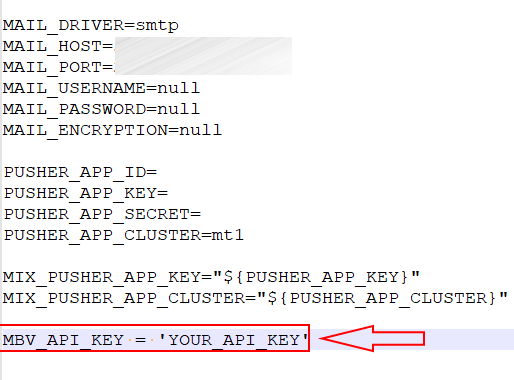
Finally, you need to add your MailboxValidator API key into your env file. Open your env file and add a new line with the field name ‘MBV_API_KEY’ and assigned your API key into it.
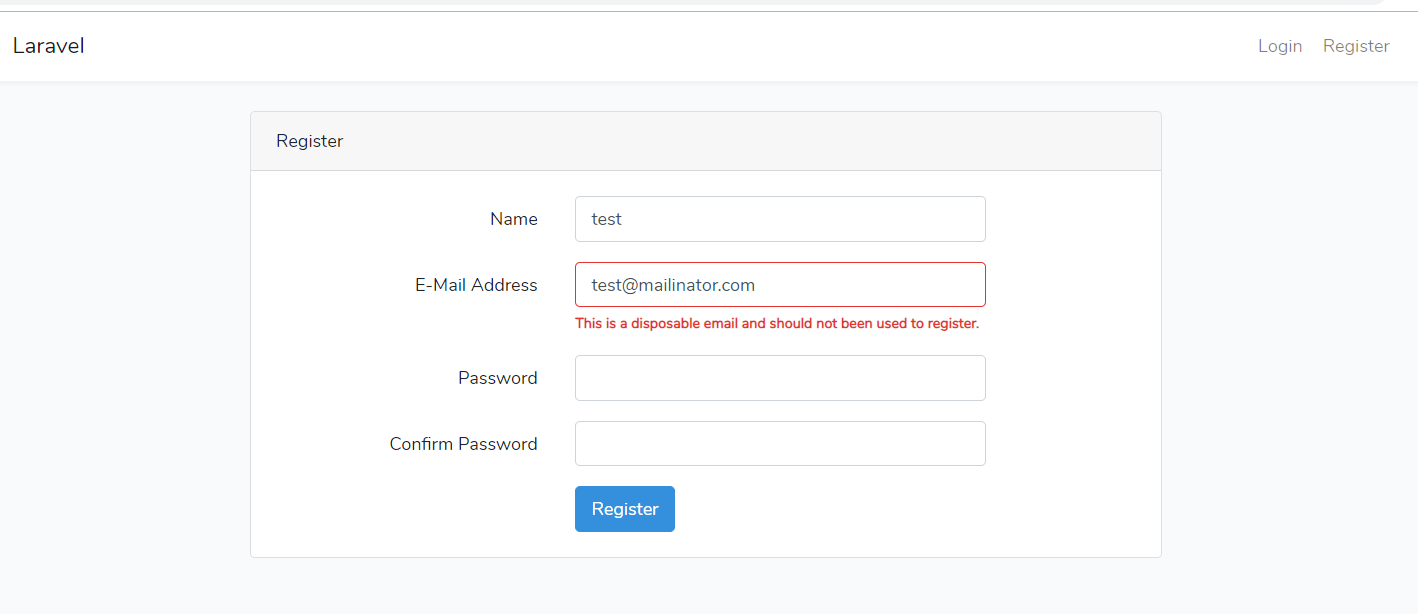
Now you can try to open your registration form and enter a disposable email address. An error message ‘This is a disposable email and should not be used to register.’ should appear after the submit button was clicked.